
Introduction
“Finally, Google launched new updates to show AI traffic in the search console, just a few days ago, and it’s been a buzz naturally. ”
But mostly among businesses, as they are curious about how it’s going to impact their website.
The AI traffic report shown in the search console has been named as “Generative AI Performance Reports” This means there are 2 reports, not just one.
So in this blog, we will discuss what these reports are and how they can be useful to you, what’s special for you and what’s not so special about them, and every important detail about them.
First of all, let’s know what Google Search Console is.
What is Google Search Console?
It is a free web service furnished by Google that lets website owners survey, maintain, and troubleshoot their site’s presence in Google search results. Is assist you in knowing how Google search crawlers view your website by providing various data so that you can optimise your website accordingly.
So, why was the Google Search Console update about Generative AI Performance Reports update needed anyway?
From an SEO perspective, it was necessary to know what traffic a website got from AI mode and an AI overview. This needed detailed reports in Google Search Console. So, finally, after such a long time, Google announced that “there will be 2 Generative AI Performance Reports in the search console.”
What are the new types of generative AI reports in Google Search Console?
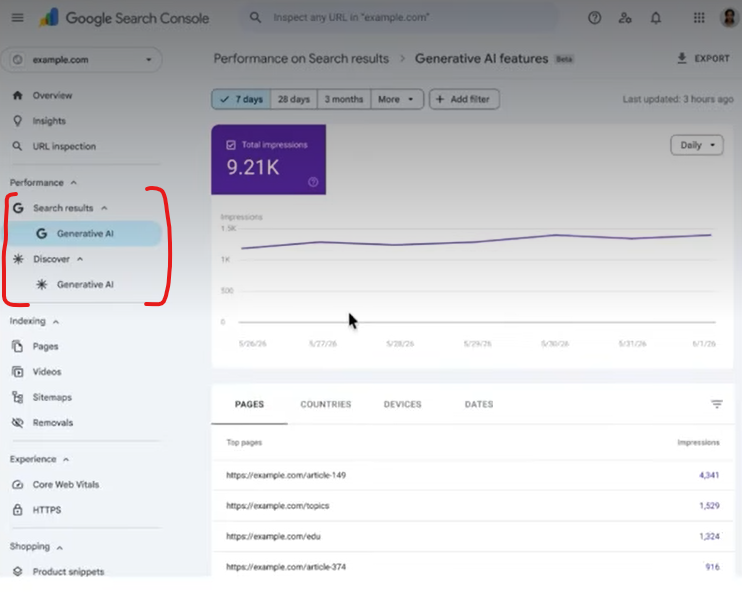
Generative AI Performance Report (Search)
This report helps in getting the reports of how many generative AI impressions you got of all the pages based on the pages, country, devices, and you can group the data by the number of days, weeks or months (depending on the selected time granularity).
Generative AI Performance Report (Discover)
Generative AI impressions data is also available in Discover reports, but you don’t get device data like in search reports. Also, no detailed reports of country data like in search reports.
Key Features of Generative AI Reporting in GSC
- Impressions: it shows the impressions of your URLs shown in the AI overviews, AI features and AI mode.
- Pages: shows which of your pages are in the AI search results like AI overviews and more such.
- Device: it also provides the name of devices like mobile, laptop, tablet or such from where the user searched.
- Country: it shows the data of the country, or the origin of location from where the search originated.
| Data limitations: the reports at present only provide the impression data. They lack click data and query information. This means you can’t see what users searched online and how many of them clicked on your site from the AI features or AI overview results. |
What is the Difference between Search Report and Discover Report?
| Search reports Multiple pages from the same site that appear in an AI overview are counted as one impression for the query. | Discover report Multiple URLs appearing in AI-based features in the feed are counted as individual impressions. |
Why Google Chose To Finally Give This Update?
It launched these reports to remove the “data blackout” surrounding AI search, satisfy publishers’ demand for visibility into AI overviews, and provide hard numbers to counter traffic loss and regulatory pressure.
Wrapping up thoughts
Google Search Console update just solved the years of issues businesses were facing by just launching two new features, like “Search” and “Dicover” in generative AI reports. This missing data was a real constraint. But now businesses can have data of Generative AI Reporting in Google Search Console in detail, like country, device, pages, and impressions.
FAQs
It is a free web service furnished by Google that lets website owners survey, maintain, and troubleshoot their site’s presence in Google search results.
From an SEO perspective, it was necessary to know what traffic a website got from AI mode and an AI overview. This needed detailed reports in Google Search Console.
They furnish the first direct measure of content visibility inside AI-generated results, helping teams make sharper decisions.