Introduction
Every sales team knows these problems: the weight of trying to grow a sales pipeline while managing everything else, like hours spent on copy-pasting contact details from LinkedIn into spreadsheets, manual follow-ups, a tight budget, time and plus lean team. You are not alone.
Many small and mid-sized companies(SMBs) feel the same. Automation can surely help here.
Research also shows that automation helps in identifying potential customers and in improving the lead quality. However, in spite of the automation included in the process to enhance the lead generation quality, the companies continue to struggle.
Now, why is that? That’s because the process is not connected to the end, and doesn’t have a proper workflow for automation.
Here comes n8n automation to the rescue!
n8n is an open-source and low-code workflow automation platform. It helps you to connect your email systems, CRMs, LinkedIn, and enrichment platforms in a single workflow.
In this blog, we will know how to build an n8n lead generation automated workflow step by step, and how to make the system run 24/7 so your team focuses on closing, not collecting.
What is n8n and How it Helps in B2B Lead Generation?
n8n is a free and open-source workflow automation tool that helps to connect apps, APIs, and data sources. It allows enterprises to automate repetitive tasks, streamlines operations, as well as build custom workflows with minimal code, making it very flexible and scalable.
For lead capture, enrichment, scoring, and outreach in B2B lead generation, use n8n to set up automations. It is to ensure faster response times, more effective personalisation, and efficient data handling that helps sales teams focus on quality prospects and close deals efficiently.
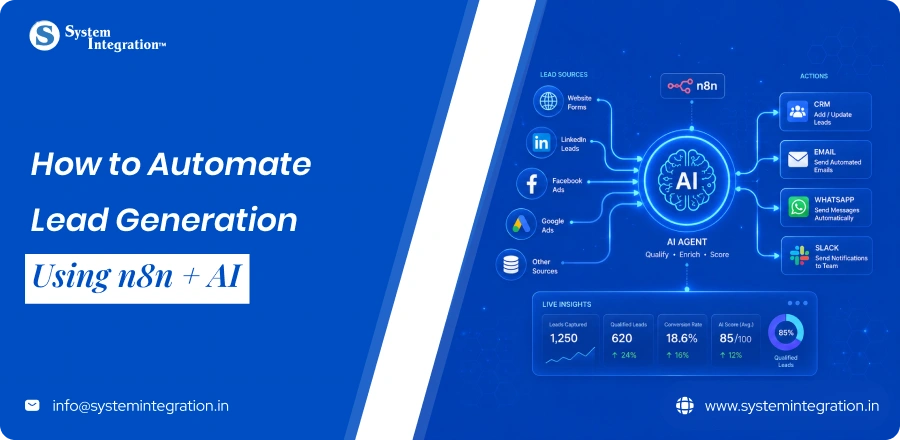
| 🧲 Captures leads from across multiple channels on autopilot 🤖 APIs and AI to Enrich and Qualify leads 🚀 Behavior-trigger personalized engagement 🔄 Syncs seamless data with CRM and sales tools |
Time Saved Per Week After n8n Automated Lead Generation
| Tasks Done Manually | Weekly Hours Spent | After Automation |
|---|---|---|
| Moving leads from forms to CRM | 3 to 5 hours | 0 |
| Writing and sending follow up emails | 4 to 6 hours | 0 |
| Creating social posts from blog content | 2 to 4 hours | 0 |
| Pulling weekly marketing reports | 1 to 2 hours | 0 |
| Re-engaging cold leads manually | 2 to 3 hours | 0 |
Step-by-Step on How to Build an n8n Lead Generation Workflow
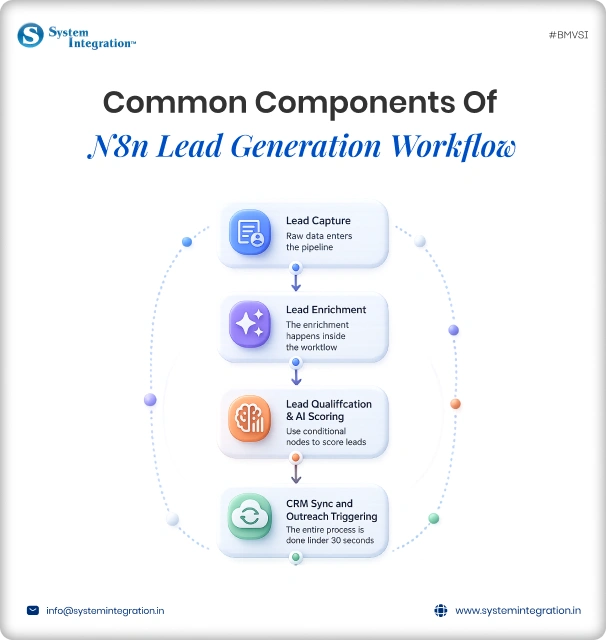
1️⃣ Configure your trigger node
First, define the trigger of your workflow. Events like form submissions, webhook invocations, or new database records. That means every new lead will automatically flow into your n8n workflow without manual intervention or delays.
2️⃣ Enrich lead data
Combine raw lead data with external APIs/databases to enrich it. Add details like the size of the company, the industry it’s in, and its social media profiles. The richer data gives you more context, so your workflow can make smarter decisions downstream.
3️⃣ AI Lead Scoring
Use AI models to score lead quality based on predefined criteria, including engagement, company fit, and intent signals. Score your leads so your system can effectively prioritise the most valuable leads.
4️⃣ Branch on score
Use conditional logic to route leads by their score. Good leads can go directly to sales, while lower-scoring ones are put in nurturing campaigns. This allows them to handle it personally and get the maximum conversion opportunities.
5️⃣ Create the CRM record
Send Qualified Lead data to your CRM system at zero Manual effort. Enrich your records to ensure your sales team are following up with all the details they need, as well as ensuring they have a complete set of the record for relationship management.
6️⃣ Notify the sales Rep
Notify the respective sales rep via Email, Slack and other media instantly. Write only the necessary details with important context so that they can respond more quickly, thereby reducing response time and improving the chances of a conversation.
Advanced n8n Lead Generation Automation Strategies
↳ LinkedIn outreach automation
Using the LinkedInHelper connected via n8n’s HTTP Request node, you can automate LinkedIn connection requests and follow-up messages. N8n acts as an orchestration layer. Triggering outreach after a lead passes qualification, throttling requests to stay within LinkedIn’s rate limits, and logging responses back to the CRM.
↳ Competitor intent monitoring
It involves moving beyond simple form submissions to building autonomous AI agents that scrape, enrich, and qualify leads, combined with high-intent competitor tracking. By integrating LLMs with tools like Apify, Apollo.io, and Gmail, these systems automate the entire sales pipeline.
↳ Event triggered sequences
The strategy is about creating automated workflows triggered by specific user actions or certain behavioural signals. You can set up a customized email or messaging sequence when a lead interacts with your product using n8n.
↳ AI-Powered lead research
With n8n, you can bring together your very own AI models and automate deep lead research at scale. It collates data from numerous sources, evaluates company insights, decision-maker roles and recent actions before creating a summary of key findings. This helps sales teams approach leads armed with hyper-relevant context, providing higher quality outreach.
Common Mistakes that Break n8n Automation
- Poor error handling
A single node can fail in your flow and ignoring error workflows will break the entire automation. Failing silently, with no fallback paths, retries, or alerts causes a loss of data/missed leads/poor performance in your workflow. - Overcomplicating workflows
Debugging is harder when you create complex workflows with a lot of nodes. It makes it less maintainable and puts more points of failure. Making workflows modular and as simple as possible serves better scalability, the clarity of purpose, and long-term viability. - Missing data validation
Incorrect processing or crashing of the workflow will result without input data validation. You often use to verify mandatory fields, expected outputs & values before execution: so you can produce clean, consistent and highly reliable automation results. - Ignoring rate limits
APIs such as LinkedIn, email tools or CRMs are highly rate-limited. They can block or fail to throw if ignored. Use throttle and delays to be compliant and not congest the execution of workflow. - Not logging or monitoring workflows
Lack of central logging and monitoring, this makes it difficult to identify any kind of issues or performance hiccups. So log important actions and create alerts to quickly find,debug, improve workflows to make it more reliable.
Bottom Line
n8n enables businesses to automate and scale B2B lead generation with focus and efficiency. With the help of tihs step by step guide and strategies you can smoothly automate your quality lead generation process.
However, to avoid the DIY n8n automation process, collaborating with the best automation company in India will make your process even more seamless, creating refined workflows, improved conversions, and long-lasting growth.
FAQs
Filtering quality leads involves automatic exclusion of generic or personal emails, validating website existence with HTTP HEAD requests, and leveraging enrichment tools like firecrawl for firmographic data. This improves outreach accuracy by targeting verified business contacts tailored to your niche and location.
No, its not necessary. n8n uses visual drag-and-drop workflow builder combined with prebuilt templates and notes, making it accessible to all technical levels.
It totally depends on the type of requirements and the complexity of the workflow you want to create and the type of tools you utilize for it.
n8n node-based workflows connect easily with CRMs like salesforce, HubSpot, and Piledrive. Leads captured and enriched through scraping workflows can be automatically sent to these platforms, enabling instant follow-up, status updates with manual data transfer.