Introduction
It’s 2026, and businesses are constantly under pressure to automate workflows, cut costs, and scale their businesses. One of the most effective ways they are doing this is through no-code and low-code automation platforms.
Here comes the n8n automation
n8n allows teams to build workflows without heavy coding, giving both technical and non-technical users the ability to automate processes. Within this growing ecosystem, n8n workflow automation has become one of the most flexible and reliable options.
There are a great number of automation platforms that exist today, but n8n is among the most powerful and flexible workflow automations tools available for startups, enterprises and IT teams.
In this blog, we will be looking at the powerful workflow automation building blocks of n8n, its features and benefits, use cases, and the best practices to create scalability-oriented enterprise-wide business automation workflows.
What is n8n Workflow Automation?
n8n is an open source workflow automation tool which helps you connect apps, automate tasks & create intelligent workflows with little to no coding.
n8n differentiates itself from traditional automation tools with its flexibility, customisation, and self-hosting capabilities, making it a great option for businesses looking for secure and scalable automation solutions.
Why is n8n popular?
There are a few reasons why n8n is one of the fastest-growing automation platforms:
- Drag and drop UI, interactive workflow builder
- Flexibility of Open Source
- Simple API integrations
- AI-powered automation features
- More advanced customisation options
- Better data control with self-hosted deployment
- Economical compared to many proprietary tools
n8n offers a scalable automation ecosystem for your marketing campaigns, customer support, lead generation, or internal business operations.
| ⚡ Top Features of n8n Workflow Automation 📌 Drag-and-Drop Workflow Builder 📌 API and Webhook Integrations 📌 AI-Powered Automation 📌 Multi-App Connectivity 📌 Custom JavaScript Functions 📌 Scheduling and Trigger-Based Automation 📌 Error Handling and Monitoring |
Advantages of Workflow Automation with n8n
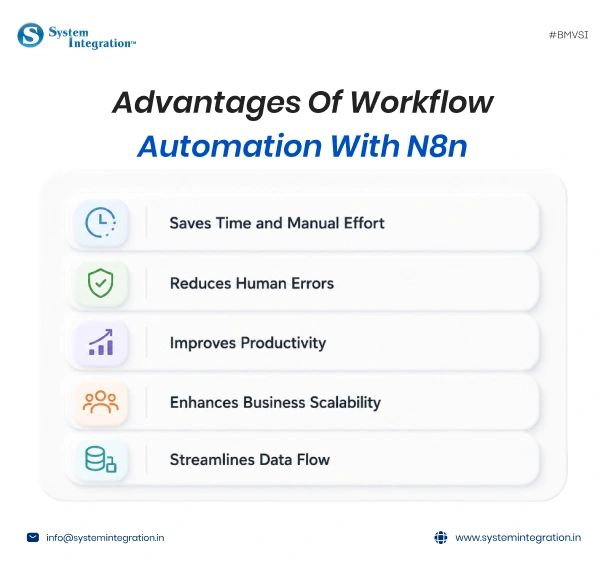
- Saves Time and Manual Effort
- Automation increases efficiency by removing repetitive and routine tasks among human employees so that they can concentrate on strategic business activities.
- Reduces Human Errors
- SilentType: Automated workflows, defined by rules that greatly decrease the chances for error from manual operations.
- Improves Productivity
- Automation processes have never been simpler, allowing teams to achieve more in less time.
- Enhances Business Scalability
- Automation workflows scale flexibly without the increased operational complexity that generally comes along with it as businesses grow.
- Streamlines Data Flow
- n8n helps eliminate silos and enables smooth data transfer between multiple systems.
n8n vs Zapier vs Make
| Feature | n8n | Zapier | Make |
|---|---|---|---|
| Open Source | Yes | No | No |
| Self Hosting | Yes | No | Limited |
| Custom Coding | Advanced | Limited | Moderate |
| AI Integration | Strong | Moderate | Moderate |
| Pricing Flexibility | High | Medium | Medium |
How to Create Workflow Automation using n8n: A Step by Step Guide
Step 1️⃣: Define What You Are Looking To Automate
Find high-traffic business processes that are repetitive and take up a lot of time, money, and other resources before creating workflows.
- Examples include:
- Lead management
- Customer onboarding
- Invoice processing
- Support ticket routing
- Marketing automation
The first step to achieving an efficient workflow is having a clear objective.
Step 2️⃣: Installing and configuring n8n
You can deploy n8n using:
Cloud Version
Best for quick set-up and low maintenance
Self-Hosted Version
Great for businesses that require comprehensive customisations and data protection.
- After installation:
- Configure credentials
- Set environment variables
- Connect required applications
Step 3️⃣: Connecting Applications and Services
n8n integrates a hundred different business tools.
- Common integrations include:
- CRM platforms
- Email marketing tools
- Project management software
- Databases
- AI services
- ERP systems
Integrations allow for centralized business workflows.
Step 4️⃣: Create Workflow Triggers
Triggers initiate workflow execution automatically.
- Popular triggers include:
- New form submission
- Customer inquiry
- Incoming email
- Scheduled event
- API request
- Database update
Such as a new lead form submission can either automatically lead assignment with an email notification.
Step 5️⃣: Design Workflow Logic
Your workflow logic determines how your automation acts.
- This includes:
- Conditional branching
- Data transformation
- Approval flows
- AI-based decision-making
- Multi-step automation sequences
Workflow Logic Automated business processes
Step 6️⃣: Add Automation Actions
Actions are the work that you should do automatically after a trigger happens.
- Examples include:
- Sending emails
- Updating CRM records
- Creating tasks
- Sending Slack notifications
- Generating reports
- Updating spreadsheets
Step 7️⃣: Test and Debug the Pipeline
Before automation deployment, testing is key.
- Check for:
- Integration errors
- Data mapping issues
- API failures
- Incorrect conditions
- Performance bottlenecks
Execution logs and debugging tools are provided for troubleshooting by n8n
Step 8️⃣: Click on deploy and run your workflow.
After tests, release the workflow into production.
- Continuous monitoring helps:
- Improve workflow efficiency
- Reduce downtime
- Detect failures early
- Optimize automation performance
It is contingent to reread the business workflows frequently so as to keep pace with data scaling and maintain correctness.
Practical n8n Automation Use Cases
1️⃣ Intelligent Lead Capture Through n8n Automation
automate a lead capture and nurturing system. A process commonly done, but one that is often done with far too many prospects falling through the cracks in many sales and marketing teams. And when you see n8n vs Zapier vs Make, and you know that the open source nature of n8n allows it to be a perfect companion for creating intelligent, fail-proof lead capture pipelines that minimise errors.
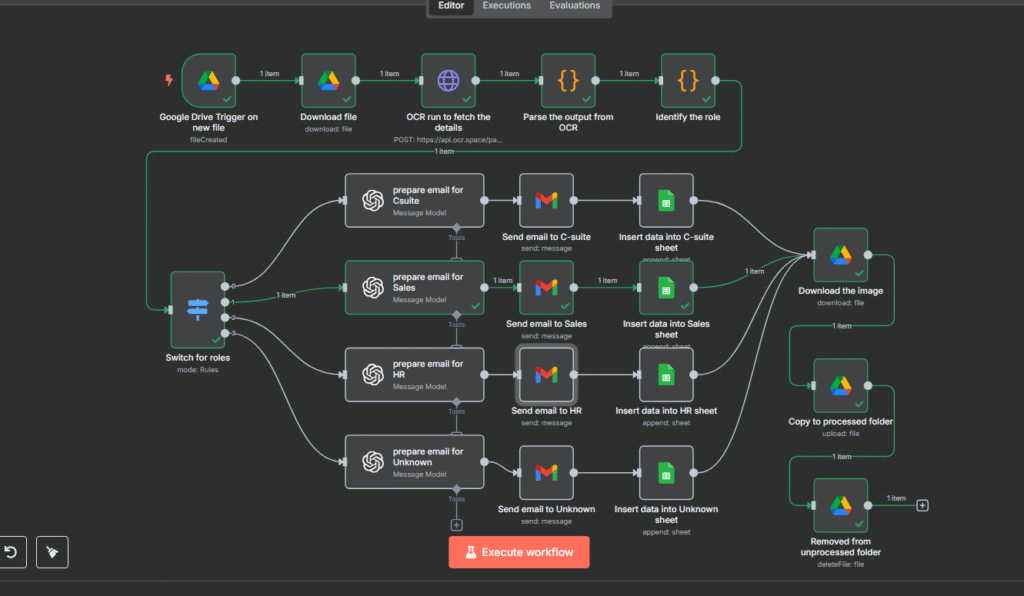
The workflow: Lead Capture with Webhook → Enriching Lead Data → Store Lead in CRM → Email Team and Inform Them.
Why automate it?
By doing things like automating data entry, email follow-ups and updates to CRM systems, companies can significantly reduce the amount of manual labour they say they need. This allows teams to work on strategic activities and become less dependent on expensive third-party tools.
2️⃣ From Slack To Summary: Automate Weekly Work Reports
n8n can automate the creation of weekly work reports from Slack messages by summarizing channel activity. This connects Slack with OpenAI, which then summarizes the message from a specific channel. This automated message is then sent or reported to another Slack channel or sometimes stored in the spreadsheet.
The workflow: To Trigger Weekly → n8n and Slack Integration → Summarizing The Creation with AI Abilities → Sends The Report To Various Channels
Why automate it?
n8n helps significantly reduce the amount of time spent on manual reporting by automating workflows. It enables users to connect various applications, automate data extraction and assist in generating reports with minimum efforts.
3️⃣ Your HR Helpdesk Powered By AI
The HR Assistant Automation is an AI software that offers support to HR. When they bother the bot in Google Chat, they get an instant answer straight from official HR documentation. This tool provides immediate, precise and standardized HR answers, autonomously by putting n8n workflow automation to work.
The workflow: Employee Ask A Question → Trigger Via Google Chat With n8n → AI Agents Processes The Query → Response Cleanup → Instant Response in Chat
Why automate it?
Policy information is available 24/7 for any kind of requirements without any hindrance in access for Employees. You can rely on solutions, which is because they always work if you are referencing your documents only.
4️⃣ Support Ticket Triage System
The support ticket triage system is used to classify the inquiry in the most important to least important manner, ensuring it assists the team in managing the large volume of data smoothly. This workflow automates sending the follow-up emails and the support tickets, capturing the response via Google Form in real time.
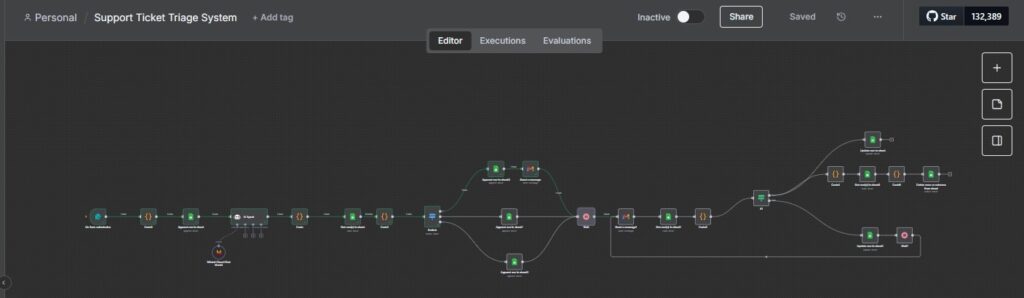
The workflow: Form Submission Trigger → Ticket Classification & Priority Assignment → Ticket Storage in Google Sheets → Follow-Up Email Automation → Response Capture from Google Sheets → Status Check & Conditional Logic → Automated Ticket removal & Changes in Status
Why automate it?
The full workflow automatically watches tickets and brings them up to date; no one will miss any call. It cuts out repetitive work, like delegated relationship tracking, follow-ups, or spreadsheet cleanup, and lets you spend time on activities where you can add more value.
The Future of Workflow Automation with n8n and AI
With automation moving beyond artificial intelligence to AI-driven intelligent workflows,
- Businesses are increasingly adopting:
- AI agents
- Predictive automation
- Hyperautomation
- Autonomous workflows
- Intelligent decision-making systems
With its flexible architecture, n8n is well suited to serve as a glue for incorporating AI into the workflows of various companies.
With the continual adoption of AI, businesses that utilize workflow automation platforms like n8n can expect massive competitive advantages.
Why Partner with BMV System Integration for Professional n8n Development Services
Our professional n8n developers make it easy to create workflows while professional development services help businesses build scalable, enterprise-grade automations.
Benefits include:
👉 Faster implementation
👉 Custom integrations
👉 AI-powered workflow development
👉 Workflow optimization
👉 Better security practices
👉 Long-term maintenance and support
Professional developers are also excellent for helping businesses integrate more complex systems through simulations.
Wrapping up Thoughts
workflow automation is no longer a choice. This shows that companies are shifting to automation platforms like n8n so they achieve efficiency, cost reduction on operations and fast scaling.
Our professional n8n development services helps provides a scalable solution as its open-source flexibility, AI integration support, advanced customization, and connection with utility offers smarter automation workflow.
By investing in powerful workflow automation solutions now, businesses can remain competitive in a changing digital world.
FAQs
Yes, the open-source version of n8n is free and can be self-hosted without licensing fees. The cloud-hosted version follows a subscription model.
Yes, n8n is secure when properly deployed and configured. It encrypts stored credentials to protect sensitive data and supports secure authentication methods for connecting to third-party services.
n8n is commonly used in:
- Startups
- SaaS platforms
- DevOps teams
- AI/ML infrastructure
- Data engineering pipelines
n8n allows you to automate workflows by connecting different applications and services through a visual editor. You can create “nodes” that represent tasks, such as sending an email, reading data from a Google Sheet, or triggering a webhook. Without writing code, you can build logic-based flows that execute actions based on conditions or triggers.