
Overview
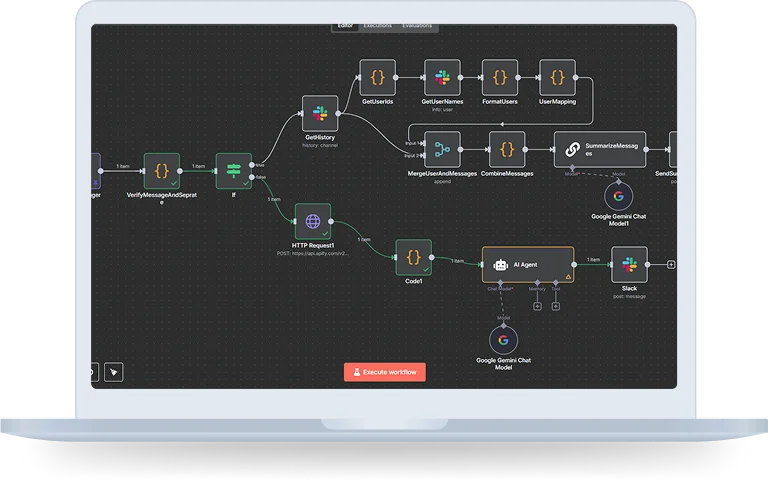
N8n can be used to create workflows that integrate ChatGPT and Google search, enabling powerful automation and AI-driven processes. This type of integration leverages n8n’s ability to connect different APIs and services and web scraping and search API.
Objective
The objective is to ease the summary making and to empower the decision making that too without upgrading the software to Slack Enterprise with the help of n8n. It even helps in directly updating the summary of any particular time into the Slack or through the email.
Further, it doesn’t only summarize the search queries, it even helps in the task like prompt based queries and conversations. This helps in predicting the context of the future conversations.
How does it work?
Use Case 1: How To Use Slack AI To Summarize Conversations
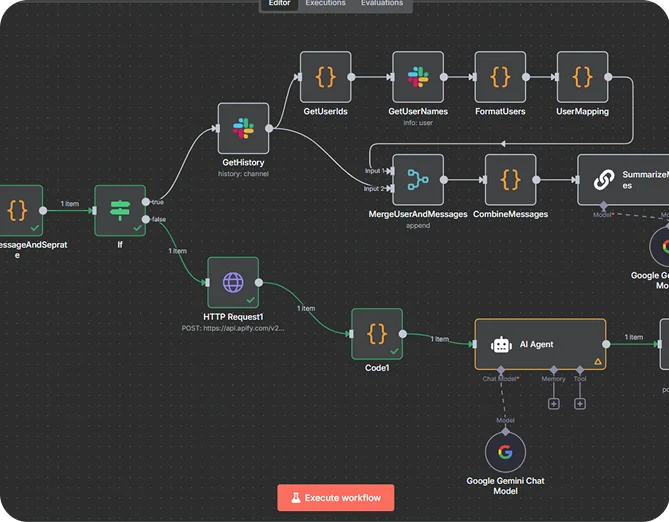
Step 1: Send Prompt
The initial step includes to send the prompt by users for the summary they want for any specific duration. For example: summarize the project XYZ for the last 7 days.
Step 2: Decide Specific Time
Filter messages based on timestamp to retrieve only the desired time range. Use JavaScript nodes or other methods to group messages into their respective thread.
Step 3: n8n Catches The Slack History
You can receive and access the message of previous nodes using the time and the day in the same node. After fetching the data it even cleans the text using the JavaScript string manipulation methods.
Step 4: OpenAI can summaries the key discussion
OpenAI can summarize the ongoing discussions, providing the context for the future conversation. This process relies on the NLP(natural language processing) capabilities of openAI.
Step 5: Summary is posted back to Slack
By using the slack node or the interactive node it sends the summary back to the Slack or email it to allow users to take their desired action.
Use Case 2: ChatGPT/ Google Search Flow
Step 1:
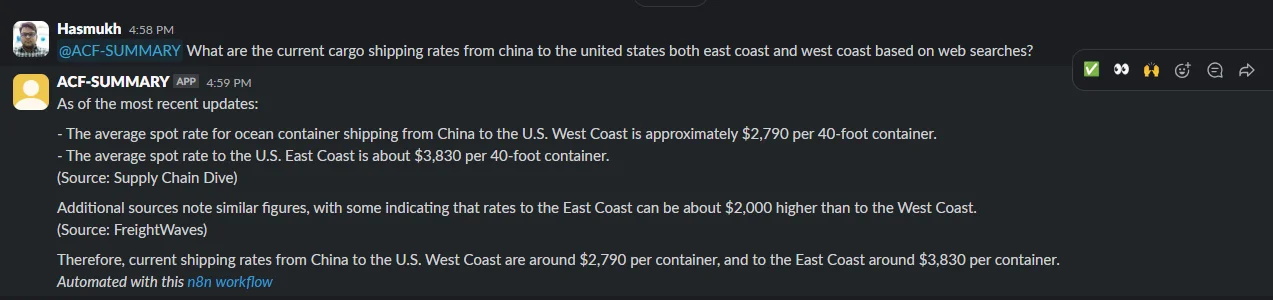
Users can ask questions in the chat on that specific platform in Slack.
Step 2: External Search using SEMrush or Apify
The workflow can invoke some external knowledge: Maybe invoke SEMrush (for marketing type questions) or Apify (for broader web scraping/search automation). This is so the responses are not restricted to what gets discussed in Slack, but are imbued with additional real-world data.
Step 3: Summarization using ChatGPT or Gemini
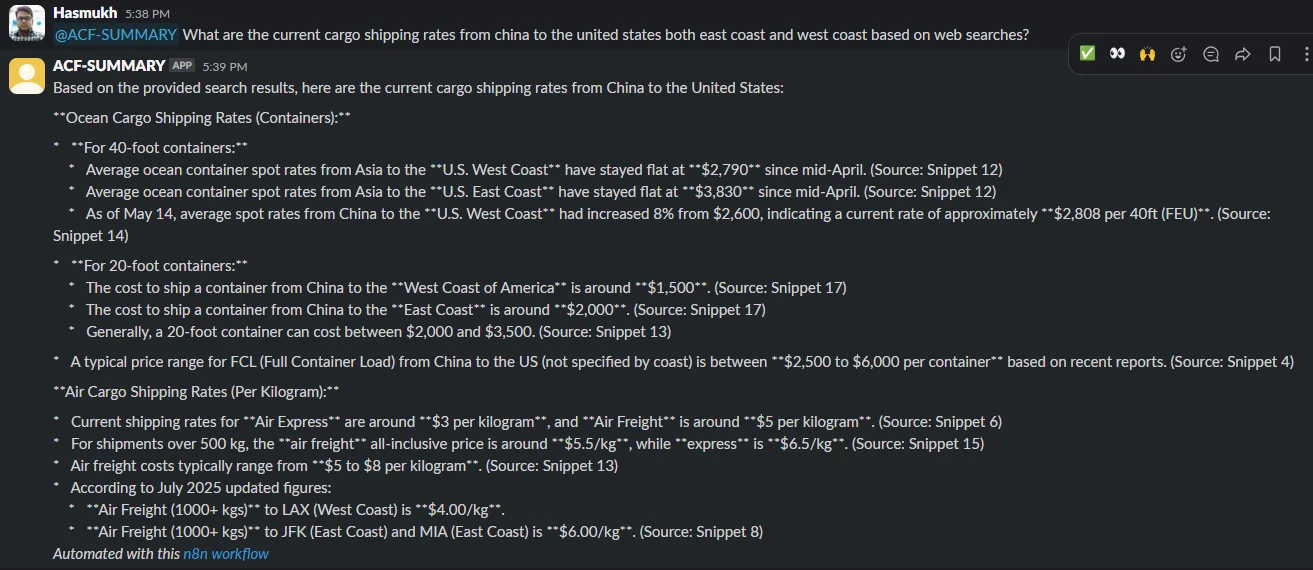
And once the data is collected, that can then be fed into an LLM like OpenAI’s ChatGPT or Google’s Gemini. Given the input, the model digests the content, generates summary in informal, natural language and renders the structured response.
Step 4: Response to AI Generated Message in Slack
Lastly, the summary response is posted back to the Slack thread. The user receives an immediate, concise response without ever exiting Slack.
Technology Stack Included
Key Benefits
Smart Summaries Without Expensive Licenses
Advanced search and analytics are common features in Slack Enterprise plans, but they are expensive to add. With the help of n8n + LLM APIs, teams could also get similar or better intelligence at a lower cost.
Rapid Catch-Up for Stakeholders
For executives or managers who can’t watch every channel, the bot delivers concise, organized reports. Instead of having to scroll 500 messages, a prompt offers a more immediate update.
Flexible & Conversational
Unlike the clunky bots of yore, you can converse with this enterprise bot naturally. There’s no need for users to learn slash commands or syntax at all—just ask your question and the bot comes back smartly.
Two Modes in One Bot
The system can operate in:
Channel Summary Mode → Converts slack conversations into an easy-to-digest summary.
General Query Mode → Answering Ad-hoc Questions using External Search + LLMs.
Closure
When integrating n8n with Slack, it is more than just a chatbot. It creates workflows that integrate ChatGPT and Google search, enabling powerful automation and AI-driven processes. This approach is best for the growing team as it assures the agile process.