
0%
reduced Administrative Task Time
0%
improved Email Drafting Speed
0%
increased Calendar Scheduling Efficiency
0%
improved Contextual Error Reduction
0%
accelerated Research Integration Speed
PROJECT OVERVIEW
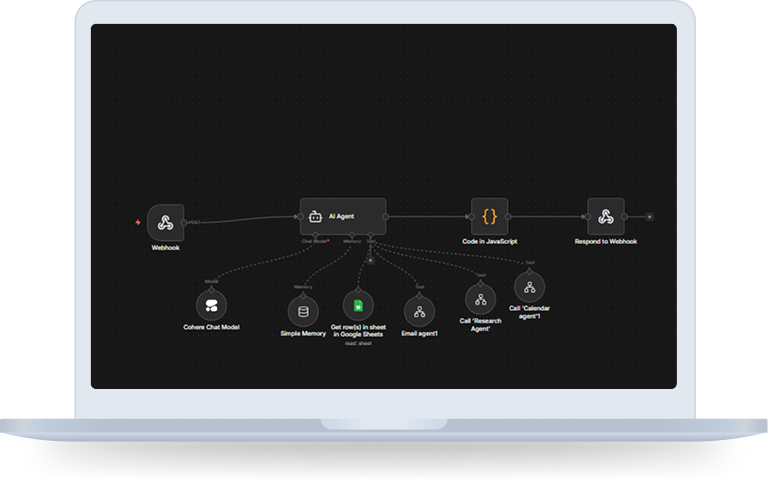
The AI Personal Multi-Agent Assistant is a fully automated orchestration system built on n8n that executes complex, multi-step tasks from a single user message.
It receives requests via a webhook, processes them through a central AI Agent powered by Cohere, and dynamically coordinates specialized sub-agents for:
- Contact lookup (Google Sheets)
- Email management (Gmail)
- Calendar scheduling (Google Calendar)
- Real-time web research (SerpAPI & Hacker News)
The assistant maintains session memory, validates actions, cleans responses, and returns structured JSON output enabling seamless automation across tools.
Objectives
-
 Create a single AI-driven assistant capable of multi-tool execution
-
 Enable chained task execution within one message
-
 Automate contact resolution before email drafting
-
 Implement full CRUD calendar operations with validation
-
 Integrate real-time web research dynamically
-
 Maintain session-based conversational memory
-
 Deliver structured, clean responses for integration use
The Challenge
Professionals often struggle with:
Managing daily operations across tools reduces productivity and increases cognitive load.
THE SOLUTION ARCHITECTURE (HOW DOES IT WORK?)
The workflow uses centralized AI orchestration combined with tool-based execution.
How does it work?
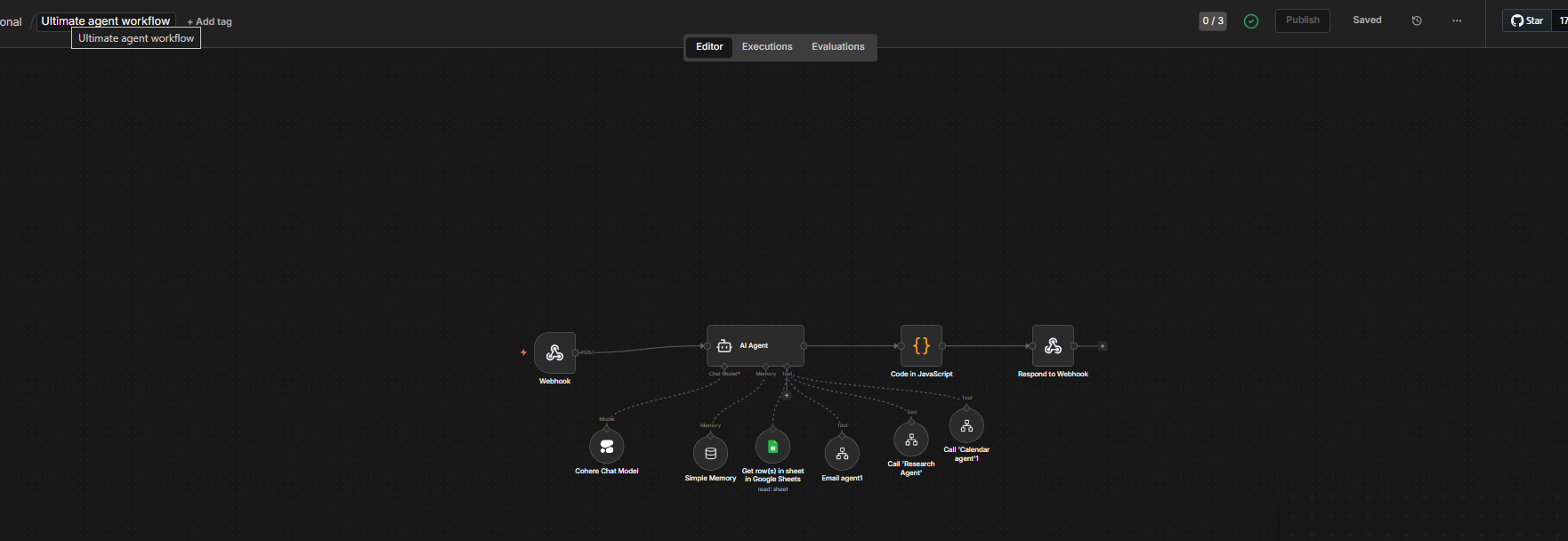
Step 1: Webhook Message Intake
- Users send a POST request containing:
- The webhook waits until the full AI response is generated before replying.
message (text or voice-transcribed input)
inputType (text or voice)
Step 2: Central AI Agent Processes the Request
- The AI Agent (Cohere-powered) reads a detailed system prompt defining when and how to use each tool.
- It selects the right tools, chains them in the correct order, and executes all steps before responding.
Step 3: Tool Execution
- The Google Sheets Tool looks up contacts (Name, Email, Phone, Company) from a live Google Sheet.
- The Email Agent Tool calls the Email sub-workflow to read Gmail messages or create draft emails.
- The Calendar Agent Tool calls the Calendar sub-workflow to create, get, update, or delete Google Calendar events.
- The Research Agent Tool calls the Research sub-workflow to search the web via SerpAPI or fetch Hacker News articles.
Step 4: Session Memory
- A Simple Memory node stores conversation history keyed by the user’s IP address.
- This allows follow-up queries like “tell me more about him” to resolve correctly without repeating context.
Step 5: Output Cleaning & Response
- A JavaScript Code node cleans the AI output — removing markdown, fixing newlines, and formatting bullets.
- The Respond to Webhook node returns a JSON object with output, timestamp, and inputType.
⇒ Research Agent – How It Works
- Receives a search query from the Main Workflow and classifies it into one of 7 types: Brief, Moderate, Detailed, Articles, Comparison, How-To, or News.
- Uses SerpAPI for general web searches → facts, trends, news, and definitions.
Uses Hacker News when the user explicitly asks for articles about a topic. - Runs 1–6 searches depending on query depth and returns a fully synthesized structured response.
⇒ Calendar Agent – How It Works
- Receives a natural-language calendar query and immediately calculates the current IST date and time via a JavaScript Code node.
- Blocks past-time CREATE requests before they reach the AI Agent, asking the user for a new time instead.
- Supports four operations:
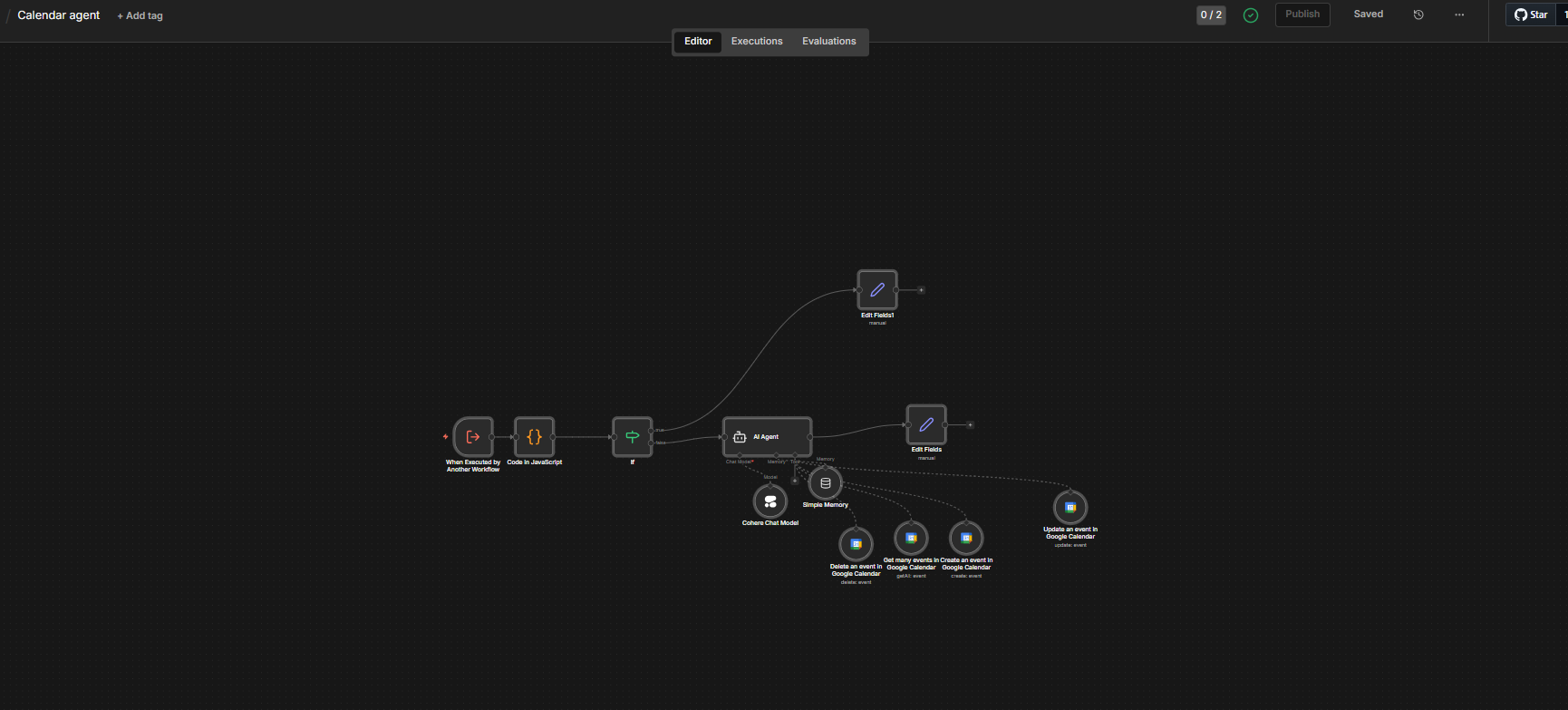
CREATE → validates title and future time, handles overnight events, creates the event, checks for conflicts.
GET → resolves date ranges like “today”, “this week”, “next Monday” and lists all events in that window.
UPDATE → performs a fresh GET first to get the current eventId, then applies the changes.
DELETE → performs a fresh GET first, shows the event to the user, asks for confirmation, then deletes.
⇒ Email Agent – How It Works
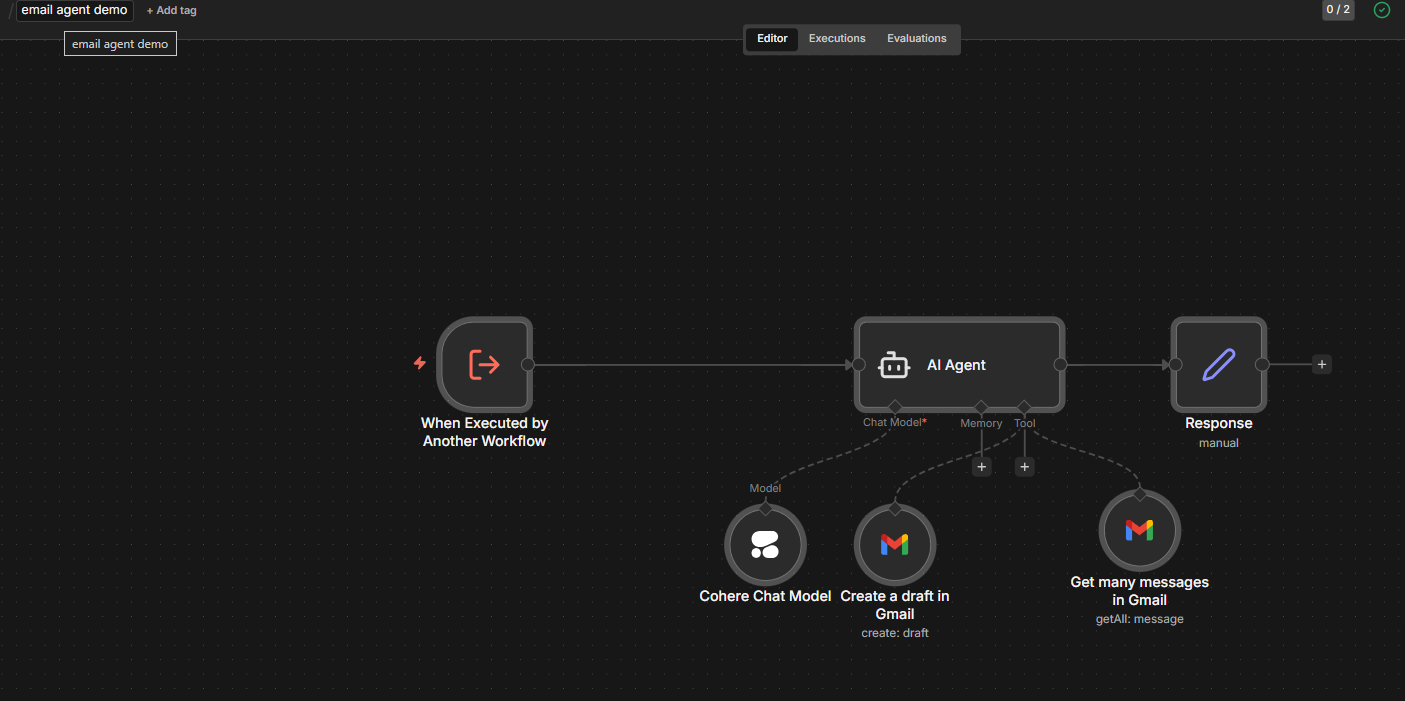
- Receives a query from the Main Workflow with a resolved email address and full context.
- Identifies whether the action is READ (grab, get, fetch, find) or WRITE (send, write, draft, compose)
- FOR READ:
- FOR WRITE:
Fetches emails filtered by sender address with a configurable limit (default 10).
Returns a numbered list with subject, human-readable date, and a 2–3 sentence preview per email.
Extracts recipient email, topic, tone hints, and any included research content.
Generates a specific subject line and writes a fully-formed email — no placeholders, ever.
Creates a Gmail draft and always signs off as: Harsh.
Technology Stack Included
Key Benefits
Multi-tool orchestration
Chained task automation
Contact-aware emailing
Smart calendar management
Real-time research integration
Session-based contextual memory
Clean, structured API-ready responses
The Solution Is Ideal For
Download The Case Study
You’re one step away from building great software. This case study will help you learn more about how BMV System Integration helps successful companies extend their tech teams.
Enter Your Detail
Closure
The n8n AI Personal Multi-Agent Assistant demonstrates how intelligent orchestration can replace fragmented manual workflows.
By combining n8n with AI-driven coordination via Cohere, and deep integrations across productivity tools, the assistant transforms routine administrative tasks into automated, context-aware workflows.
This is not just a chatbot, it is a centralized productivity engine capable of executing complex, real-world tasks with minimal human effort.
It empowers professionals to focus on strategic work while automation handles operational execution seamlessly.
