
Introduction
Let’s face it, developing a modern website without AI is like you are using a keypad to create a smartphone app😂.
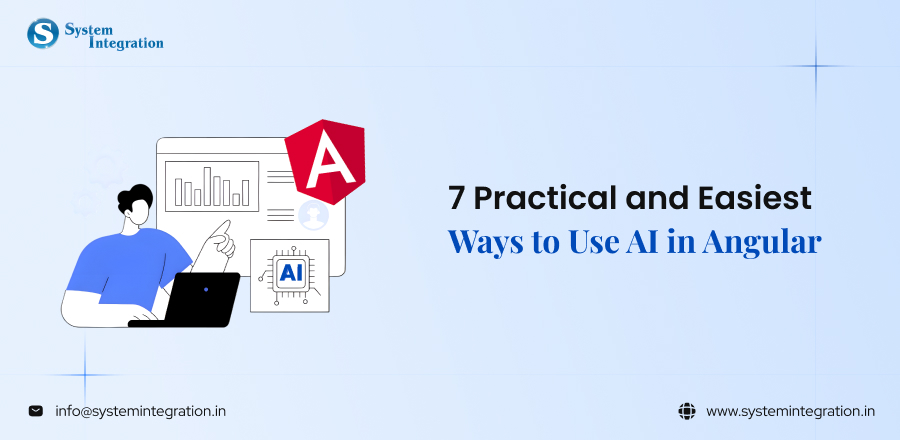
These days, Angular’s AI is revolutionising how programmers create more intelligent, quick, and user-friendly apps. AI is now production-ready, so you can use it from chatbots and intelligent search to predictive forms and customised dashboards.
Imagine now connecting that AI with the robust framework of Angular. Smart automation combined with structured architecture is a developer’s dream come true. Scalability is handled by Angular, while intelligence is handled by AI.
Thus, let’s know the seven simplest ways to use AI in Angular, which are covered in this guide, without making your project look too complicated. You will leave with useful, realistic ideas that you can put into practice, regardless of your level of experience as a developer.
Why use AI in Angular?
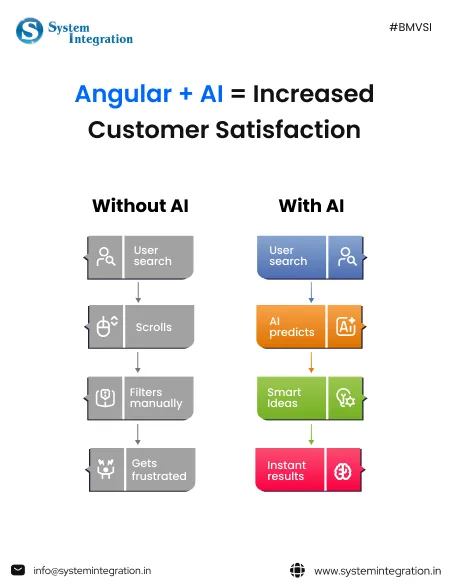
Since users now demand that apps don’t just respond, but think, predict and personalize.
By implanting AI within Angular, your application goes from presenting the user with a static interface to providing an intelligent experience.
👉 Rather than users trawling, AI suggests in an instance.
👉 AI that predicts input instead of filling long forms.
👉 AI personalizes content on a second-by-second basis instead of generic dashboards.
With Angular, you already have structure, scalability and performance. Plus, adding AI development into the app, and it becomes:
🚀 Smart - It learns from user behaviour
⚡ Dynamic – Changing on the go
🤖 Automate – Save yourself time and reduce possible human errors!
📊 Insight-driven – Recognizes patterns and makes better decisions.
The result? Better engagement. Faster workflows. Smarter applications.
Necessities Before Integrating AI into Angular
⬗ Strong Understanding of Angular Fundamentals
You will need a basic understanding of Angular components, services, modules, routing, and HTTPClient before you can get on with adding AI. You need to understand state management and RxJS because many of the AI component integrations you do involve async calls from APIs, real-time data manipulation etc..
⬗ Fundamental Understanding of AI & Machine Learning Fundamentals
You don’t have to be a data scientist, but you should know about APIs, machine learning models, prompts, inference and data processing. Key to integrating AI models is understanding how an AI model generates responses and how you can deal with those outputs.
⬗ Knowledge of REST APIs & Backend Integration
Most AI functionality is cloud-based and used via APIs. You need to be able to send secure HTTP requests, manage tokens, handle authentication and process JSON responses in your Angular architecture.
⬗ Environment & API Key Protection
AI integrations require API keys. Never implement them directly in the code of your frontend! Consider environment files too, and also secure sensitive operations with a backend layer to avoid misuse, unauthorised access or unintended billing.
7 Easiest Ways to Use AI in Angular
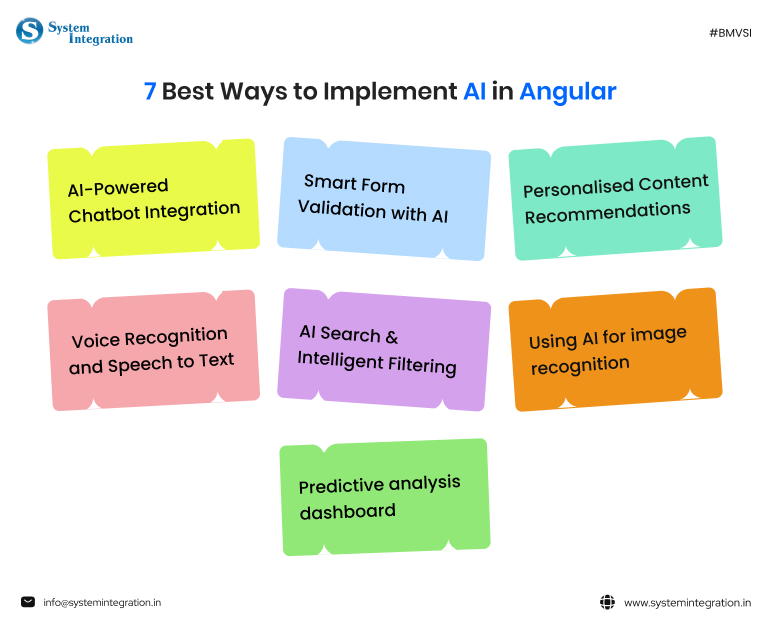
1) AI-Powered Chatbot Integration
User engagement can be largely enhanced in Angular apps by using AI chatbot services. By utilising AI APIs like OpenAI or Dialogflow with Angular’s HTTPClient, developers can build intelligent conversational interfaces that offer assistance in real time, answers frequently asked questions and automate customer support.
Such chatbots are able to process several requests at the same time, decrease workload of the support team and provide custom-tailored responses according to user activity history. Using Angular’s reactive forms and state management, you can create a slick real-time chat UI that will make your users feel like they’re using a dynamic, responsive app.
Example:
An e-commerce app in Angular that showcases the implementation of an AI chatbot. It is used to help users keep the track of orders, recommend products and provide instant solutions on refund related queries.
| 🎯 Why It Matters AI chatbots improve customer service because they are low-cost, enhance the customer experience, and support businesses with 24/7 availability. |

2) Smart Form Validation with AI
AI-based validation does even more, by also identifying spam messages, predicting what a user intends to do and offering suggestions in real-time. Combined with AI APIs, angular forms can smartly validate content.
AI can also identify scam entries, auto-fix grammatical errors, and give suggestion on what user should input which only lead us to improve accuracy of data. This provides a better user experience and decreases false commits as well as time spent on manual verification.
Example:
A job portal that is developed in Angular and uses AI to analyze resume uploads and suggest improvements before applying.
| 🎯 Why It Matters Poor-quality data causes business inefficiencies and security issues. By validating data through AI, businesses can create accurate data recordings which enhance user experience while reducing the amount of time spent manually verifying records. |
3) Personalized Content Recommendations
An AI data collection service allows Angular applications to fetch user data to provide personalised data that depends on user behavior, search history, or choices. You can connect an API to give your frontend in Angular access to item recommendations and display them as they become available.
This will increase user interaction, time on the website, and conversion rates. The component-based structure of Angular simplifies the process of producing and displaying dynamic recommendations without having to reload the page.
Example:
An Angular-based streaming service where movies are suggested based on how often users viewed similar films and how they rated those films.
| 🎯 Why It Matters Personalized content leads users to be more engaged, increased conversion rates, and better customer retention. When a user receives personalized content based on their interests, they are more likely to respond positively. |
4) Voice Recognition and Speech to Text
Voice recognition can make using an application easier, therefore enhancing accessibility and user convenience. Voice commands can be converted into text using Browser APIs such as the Web Speech API or AI-based speech services for searching, navigating, and completing forms in Angular applications.
These voice recognition/speech-to-text capabilities are especially useful in mobile-first applications and accessibility-focused applications. They enable users to exert less effort to input information (instead of typing) and offer an up-to-date, hands-free user interface.
Example:
In a travel booking Angular application, users can search for flights by saying where they want to go, rather than typing in their destination.
| 🎯 Why It Matters Voice search continues to grow rapidly. Implementing voice search capabilities improves accessibility and increases user satisfaction while providing users with a better mobile experience. |
5) AI Search & Intelligent Filtering
AI Search is more than keyword-based matching because it understands how users think through Natural Language Processing (NLP). By using Semantic Search APIs to integrate with your Angular application, you will provide smarter results that are more accurate.
With Intelligent Filtering, you can help users find what they are looking for (even if they use a vague search term). As a result of Intelligent Filtering, you will help improve user satisfaction and significantly reduce bounce rates.
Example:
An Angular-based online book retailer enables users to search for books related to “Books About Startup Growth,” and AI will return a list of relevant Business and Entrepreneurship books.
| 🎯 Why It Matters By providing relevant search results through AI-powered search, users are satisfied with their experience on the platform, causing a reduction in bounce rates, and driving a higher number of user engagements. |
6) Using AI for image recognition
It helps Angular apps analyze any uploaded photographs for tagging/moderating/validating purposes. By integrating AI image APIs into your app’s design, developers can automatically detect people, objects, and inappropriate content.
AI image recognition can be very helpful when building social networks or marketplaces. Files can be uploaded via Angular while the stored photo is processed with AI on the back end to give an intelligent insight into the uploaded file.
Example:
When a user uploads an image of a product that he wants to sell, AI will determine whether or not the image meets product image standards.
| 🎯 Why It Matters AI image recognition enables quicker moderation of user-generated photo content, increases the quality of moderated content, improves brand reputation, and minimizes the time needed for human review. |
7) Predictive analysis dashboard
This assists companies in making data-driven decisions. When combining Angular Dashboards with AI or ML models, it creates a visual way of representing future trend predictions, sales forecasts and performance predictions.
With Angular’s charting libraries and the ability to integrate AI APIs, you can create interactive dashboards that are constantly updating. This provides visual insights to stakeholders which they can act on.
Example:
A SaaS company utilizes an Angular dashboard with AI forecasting tools for predicting their monthly revenue and customer churn rates.
| 🎯 Why It Matters When making data-driven decisions, companies can take fewer risks and improve business growth opportunities. Through predictive insights, companies can take action in a proactive manner rather than a reactive manner. |
Best AI Tools and APIs for Angular Developers
OpenAI API
Ideal for developing chatbots, creating or repurposing content, creating summaries, implementing intelligent searches, and using AI-powered assistants in Angular-based applications.
Developers of Angular applications can simply integrate OpenAI’s API into their applications immediately via the use of HttpClient to send requests known as prompts and retrieve answers from the API on a real-time basis.
Best for: Creating chatbots; Automating workflows and intelligent processes; and Integrating UI elements that leverage AI technology.
Google Cloud AI
These services have the ability to scale and can be easily integrated into a wide range of enterprise applications. Developers can easily consume Google Cloud AI services from their Angular apps via REST API requests for image recognition; sentiment analysis; and processing of voice input.
Best for: Enterprise applications, image recognition; speech systems; and creating applications with Natural Language Processing (NLP) capabilities.
Microsoft Azure AI
The Azure AI platform offers an extensive collection of tools including the Azure OpenAI Service, Cognitive Services and Bot Framework, allowing businesses using Microsoft platforms to take advantage of powerful business, predictive analytics dashboards and AI-based automation capabilities all on a secure cloud solution.
Best for: enterprise solutions, AI-based dashboards, chatbots and secure environments.
Using TensorFlow.js
Using TensorFlow.js in the browser provides a way for developers to run machine learning models in their apps, rather than relying solely on the Cloud API for ML processing. As a result, developers can make real-time predictions like image classification and build light-weight ML models for their users without having to make multiple calls to the server.
best for: browser-based AI applications, performance-based applications and applications that need offline capability.
Wrapping Up Words
Angular’s AI is revolutionising how programmers create more intelligent, quick, and user-friendly apps. AI is now production-ready, so you can use it from chatbots and intelligent search to predictive forms and customised dashboards.
Thus, integrate AI into your Angular app to take more benefits of it. However, this process can be tough, but you can make it easier with collaborating with the best AI automation company in India to tackle with all the technical challenges in AI integration.
FAQs
The most effortless way to integrate AI capabilities into your Angular is be using ready-made AI libraries and APIs. this tools enables you to impliments predictive search, smart forms and much more.
- Security & data privacy of user data
- Performance bottlenecks if AI is poorly integrated
- Technical complexity and evolution of AI models
- Debugging and testig AI generated codes
First thing and much obvious thing is that it can help developes to generate codes, enforcing coding standards, suggesting unit tests, and optimizing code performance.
Angular is a suitable framework for developing AI-driven applications. Its modular architecture, component-based structure, and support for reactive programming make it a robust choice.