
0–85%
decrease in Average Research Time
0%
reduction in Manual Effort
0%
reduction in content creation time
0%
decrease in documentation error
PROJECT OVERVIEW
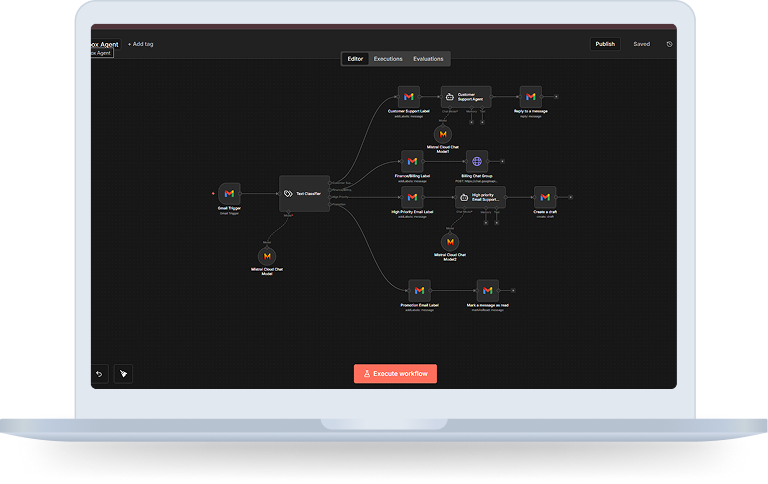
The AI-Powered Gmail Email Management Automation is an advanced workflow built on n8n that transforms a traditional inbox into a self-managing, AI-driven communication system.
The solution continuously monitors incoming emails, classifies them using AI, applies appropriate Gmail labels, generates automated replies or drafts, and escalates finance-related conversations to internal teams, all in real time and without manual intervention.
Designed for founders, support teams, and growing businesses, this automation eliminates inbox overload while improving response speed, prioritization accuracy, and communication consistency.
Objectives

Automate email classification and routing in real time

Reduce manual inbox management effort

Improve response time for customer support inquiries

Ensure high-priority emails receive immediate attention

Escalate finance and billing emails automatically

Maintain consistent brand tone in responses

Keep the inbox clean and structured at all times
THE CHALLENGE
Organizations handling high email volumes often face:
As businesses grow, inbox management becomes a daily operational bottleneck that impacts both customer experience and internal efficiency.
The Solution Architecture
The automation integrates AI-driven classification with structured workflow orchestration.
How does it work?
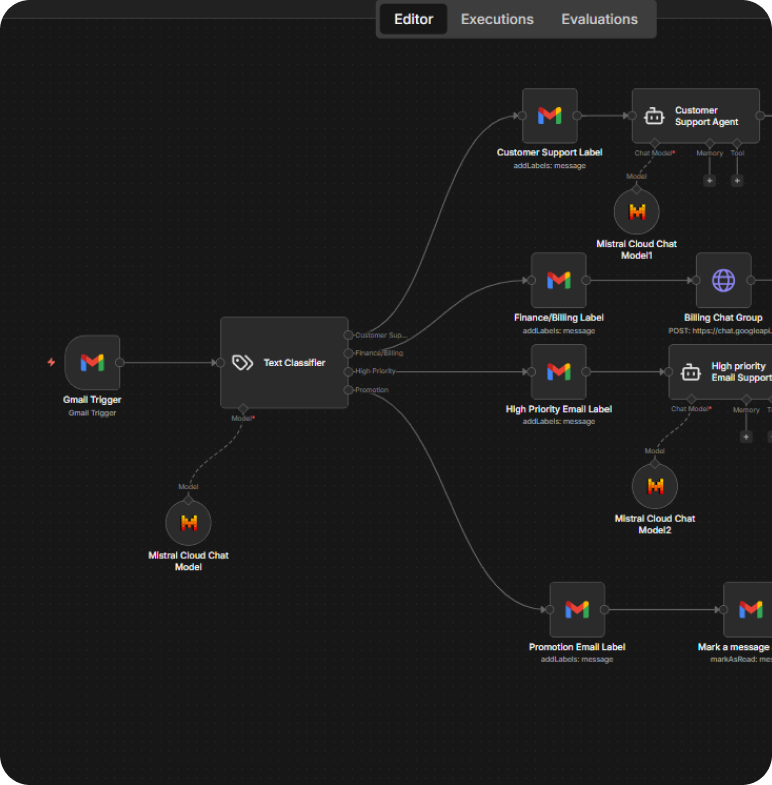
Step 1: Real-Time Gmail Monitoring
The workflow continuously polls the inbox every minute via Gmail API.
When a new email arrives, it captures:
- Subject
- Body content
- Sender details
- Message ID and thread ID
This data becomes the input for AI-based classification.
Step 2: AI-Based Email Classification
The email content (subject + body) is passed to an AI Text Classifier powered by the Mistral Cloud Chat Model.
The classifier intelligently categorizes emails into one of the following:
- Customer Support
- Finance / Billing
- High Priority
- Promotion
Each category is defined with clear intent-based descriptions to ensure accurate routing.
Step 3: Automatic Gmail Labeling
Based on the classification result, the workflow applies the corresponding Gmail label automatically:
- Customer Support → Customer Support Label
- Finance / Billing → Finance/Billing Label
- High Priority → High Priority Email Label
- Promotion → Promotion Email Label
This keeps the inbox clean, organized, and searchable at all times.
Step 4: Customer Support AI Auto-Reply
If an email is classified as Customer Support:
- The email is sent to a dedicated Customer Support AI Agent
- The agent generates a clear, friendly, and professional response aligned with Harsh’s brand tone.
- The system automatically replies to the email using Gmail
- The response always ends with:
Harsh’s AI Assistant:
This ensures fast, consistent support replies without manual effort.
Step 5: High-Priority Email Handling & Draft Creation
If an email is marked as High Priority:
- The message is routed to a High-Priority AI Assistant.
- The agent responds with urgency, clarity, and professionalism.
- Instead of sending immediately, the workflow creates a Gmail draft.
- The draft is linked to the original thread and ready for review or approval.
This prevents accidental auto-sending while still saving response time.
Step 6: Finance & Billing Escalation to Internal Chat
For Finance/Billing emails:
- The workflow sends a structured alert to a Google Chat billing group.
- The message includes:
-
Sender name and email
Email subject
Date and time received
This ensures the billing team is notified instantly and can act without checking email manually.
Step 7: Promotion Email Handling
Promotional emails are:
- Labeled appropriately
- Automatically marked as read
No replies are sent, keeping distractions out of the primary inbox.
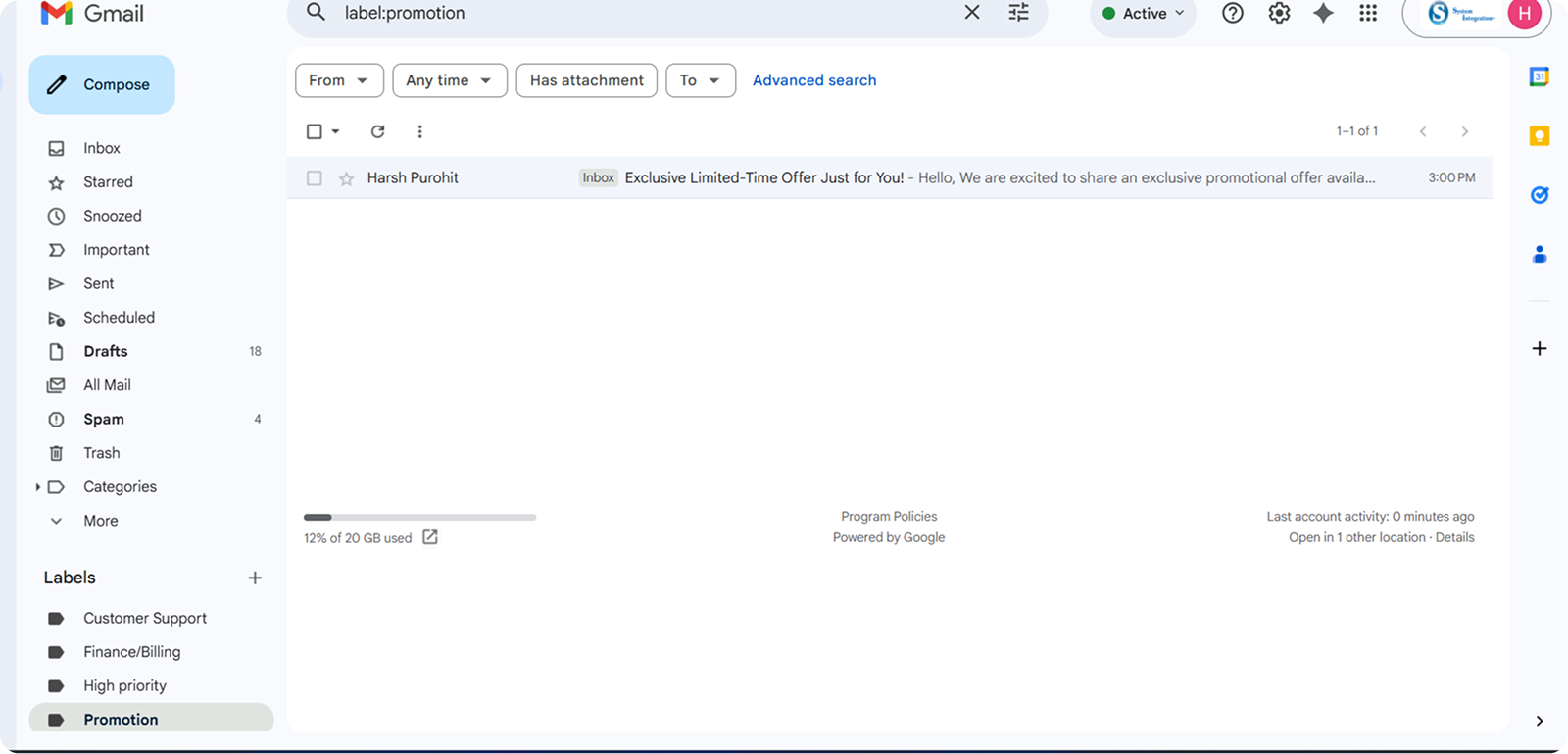
Step 8: Inbox Hygiene Automation
To maintain a clean inbox:
- Promotional emails are marked as read
- Customer support and billing emails are handled instantly
- High-priority emails are surfaced with drafts ready
- No email is left unattended
Technology Stack Included
Key Benefits
AI-powered real-time classification
Automated replies and draft generation
Intelligent escalation workflows
Structured inbox labeling
Zero unattended emails
Brand-consistent communication
Internal team notification automation
The Solution Is Ideal For
Download The Case Study
You’re one step away from building great software. This case study will help you learn more about how BMV System Integration helps successful companies extend their tech teams.
Enter Your Detail
Closure
The AI-Powered Gmail Email Management Automation demonstrates how workflow automation and AI can transform everyday business communication into a strategic advantage.
By leveraging n8n, intelligent classification through Mistral, and seamless integration with Gmail, the solution eliminates inbox overload while ensuring faster, smarter, and more consistent communication.
Rather than reacting to emails, organizations gain a proactive, structured, and scalable inbox system that enhances productivity, improves customer experience, and supports sustainable business growth.
This is not just inbox automation, it is intelligent communication infrastructure.
